Caricature from photo: pick the right picture
To make a caricature from a photo, start with a sharp, well-lit shot where the face looks at the camera. Glasses, a beard and your own hairstyle are welcome, because the drawing keeps them. One or two people can be in the frame. Upload a JPG, PNG or WebP file, pick a style and check the free preview.
By The Mugdoodle team (Product and testing). Last updated .
1. Your photo
JPG, PNG or WebP up to 12 MB
One or two people, faces toward the camera, good light.
The picture gets an outfit and props that fit. Leave it empty for a plain caricature.
We delete your photo as soon as the picture is made. Only upload photos of yourself or of people who agreed to it.
How to make a caricature from a photo, step by step
First, choose a shot where the face is sharp and both eyes are easy to see.
Then check the light. Soft daylight from a window beats a dark room or a harsh flash.
Next, upload the file as a JPG, PNG or WebP, up to 12 MB.
After that, pick one of the ten styles and press the button.
Finally, hold the preview next to the original and compare hair, glasses and smile.
The first 2 previews each day are free. After that, see the pricing page for packs and plans, or read how we test the tool.
Caricature from photo tested with a real photo file
We sent our own test photo through the same style prompt this page uses. The person in it is illustrative: an image model made that photo, so it shows no real person. Below you can see the photo next to the caricature, so you can judge the likeness yourself.
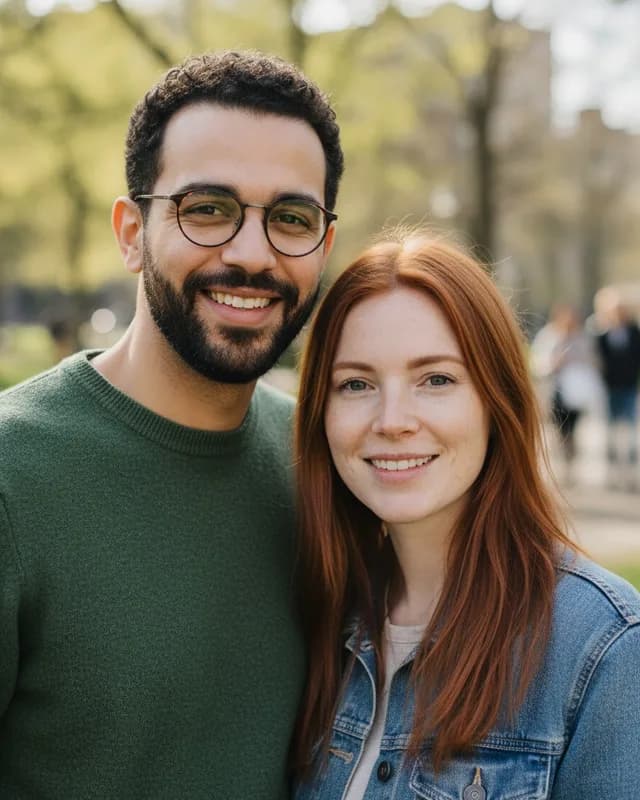
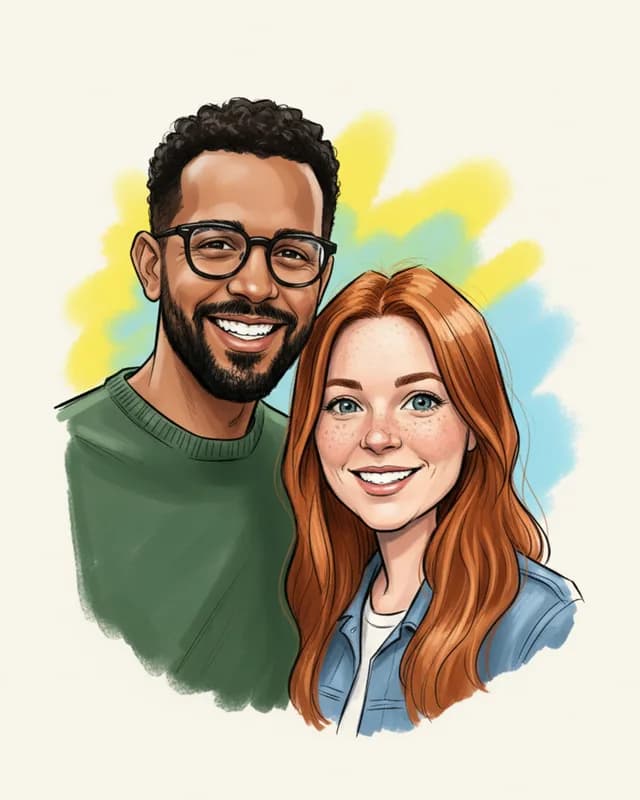
- Test photo
- Illustrative photo of a couple, 896 x 1152 px, 239 KB JPG
- Result
- Classic caricature
- Style
- Classic
- HD file
- 2048 x 2560 px JPG
- Print size at 256 dpi
- 8 x 10 in
- Free preview
- 1024 x 1280 px, watermarked
- Made by
- gemini-2.5-flash-image
- Style prompt
- 170 words
- HD file size
- 764 KB
How we test: every style gets the same test photos, and we compare each caricature with its photo by hand. More on the about page.
Which photo makes a good caricature
The model can only exaggerate what it can see. So a clear face matters more than a fancy camera. A phone selfie at arm's length works well, as long as the face fills a good part of the frame.
Look for three things. First, the head should face the camera, or turn only a little. Second, the picture should be sharp, with no motion blur. Third, nothing should cover the face, such as a hand, a mask or a cup.
A real expression helps too. The drawing keeps your expression and then turns it up, so a relaxed smile gives the model something to play with.
Lighting that helps the drawing
Soft, even light is the safest choice. Stand near a window, or step outside on a cloudy day. Then the skin tone, the eye color and the hair color all read true, and the drawing can keep them.
Hard light causes trouble. A strong sun from above puts dark shadows under the brows, while a flash at night flattens the face. Backlight is worse still, because a bright window behind you turns the face into a dark shape.
Do not worry about the room, however. The tool replaces the background with the one that belongs to the style, such as plain paper or a sky blue field.
Glasses, beards and hats
Keep your glasses on if people know you with them. Our prompts ask the model to keep glasses, facial hair, hairstyle and hair color. Clear lenses are best, since dark sunglasses hide the eyes and leave the model to guess.
In our test, the man wore thin round glasses and a short beard. The drawing kept both. However, it made the frames thicker and darker than the real ones. That is typical: a caricature leans on the things people notice first.
Hats are a different story. Our prompts do not mention them, so a cap may stay, change shape or vanish. A brim can also shade the eyes. Therefore take the hat off, unless the hat is the whole point of the picture.
A caricature from a photo of two people
One upload may show one or two people. The prompt tells the model to keep the same number of people and to add no one. So a couple, two friends or a parent with a grown child can share one drawing.
Put both heads close together and at a similar size. In our test shot, the two stand shoulder to shoulder in a park. The Classic drawing kept his dark curls and green sweater, her long red hair and her denim jacket. It also made her freckles stronger and swapped the park for a yellow and blue splash.
Three or more faces are too many for this tool. Small faces at the back lose detail, and the model may merge or drop someone. For a group, draw each person alone instead.
When a caricature from a photo is not a good choice
This tool is the wrong pick for a party where guests want to watch an artist draw. Hire a street artist for that. It is also wrong for groups of three or more, for vector files and for an exact likeness with a guarantee.
Names and captions inside the picture are out as well, because the prompt asks for no text. Small symbols can still land on props, so check the preview.
Last, think about consent. Upload your own face, or a face whose owner said yes. A friendly drawing can still hurt when someone never agreed to it.
Photo checklist for a caricature
| Item | What works |
|---|---|
| File type | JPG, PNG or WebP, up to 12 MB |
| Smallest size | 256 px on each side |
| People | One or two, heads close together |
| Face | Toward the camera, sharp, nothing in front of it |
| Light | Soft daylight, no strong backlight |
| Kept by the prompt | Face shape, hairstyle, hair color, skin tone, eye color, glasses, facial hair, expression |
| Replaced | The whole background |
| Rotation | Phone shots come out upright |
| Result | Vertical 4:5, free preview 1024 x 1280 px with a watermark |
Caricature from photo FAQ
How do I make a caricature from a photo?
Upload one clear shot of the face, pick a style and press the button. Then check the free preview. If the likeness is good, one credit returns the clean 2048 x 2560 px file.
What kind of picture works best?
A sharp shot in soft daylight works best, with the face toward the camera. Also make sure nothing covers the eyes or the mouth.
Can I keep my glasses on?
Yes. The prompt asks the model to keep glasses, so they show up in the drawing. Sunglasses are a weaker choice, because they hide the eyes.
Does a hat stay in the drawing?
Maybe. Our prompts do not mention hats, so the model decides. If the hat matters to you, check the preview, and try again without it if the result looks odd.
Can I make a caricature from a photo online for free?
Yes. Two previews a day are free and need no account. Each one is 1024 x 1280 px with a watermark, while the clean file costs one credit.
Can I use an old or scanned picture?
Yes, as long as the file is a JPG, PNG or WebP and the face is sharp. A faded scan gives the model less to work with, so the likeness may be weaker.
Can I upload a picture of someone else?
Only if you have the right to use it and the person agreed. For a child, a parent or guardian must agree instead.
Do you store what I upload?
No. The server sends your file to the image model for one request and then forgets it. We keep neither the upload nor the result.