Photo to caricature converter with a free preview
To convert a photo to caricature art, upload one JPG, PNG or WebP file of up to 12 MB and pick a style. The server shrinks a copy, sends it to the image model with a fixed prompt and returns a vertical 4:5 drawing. The free preview is 1024 x 1280 px with a watermark. After the response, the server forgets your file.
By The Mugdoodle team (Product and testing). Last updated .
1. Your photo
JPG, PNG or WebP up to 12 MB
One or two people, faces toward the camera, good light.
The picture gets an outfit and props that fit. Leave it empty for a plain caricature.
We delete your photo as soon as the picture is made. Only upload photos of yourself or of people who agreed to it.
How to convert a photo to caricature art, step by step
First, choose the file on your phone or computer. It can be a JPG, a PNG or a WebP.
Then drop it on the upload box. The tool checks the type and the size before anything else.
Next, pick one of the ten styles. This page opens with Watercolor.
After that, press the button and wait while the model draws.
Finally, save the watermarked preview, or spend one credit on the clean HD file.
The first 2 previews each day are free. After that, see the pricing page for packs and plans, or read how we test the tool.
Photo to caricature tested with a real photo file
We sent our own test photo through the same style prompt this page uses. The person in it is illustrative: an image model made that photo, so it shows no real person. Below you can see the photo next to the caricature, so you can judge the likeness yourself.

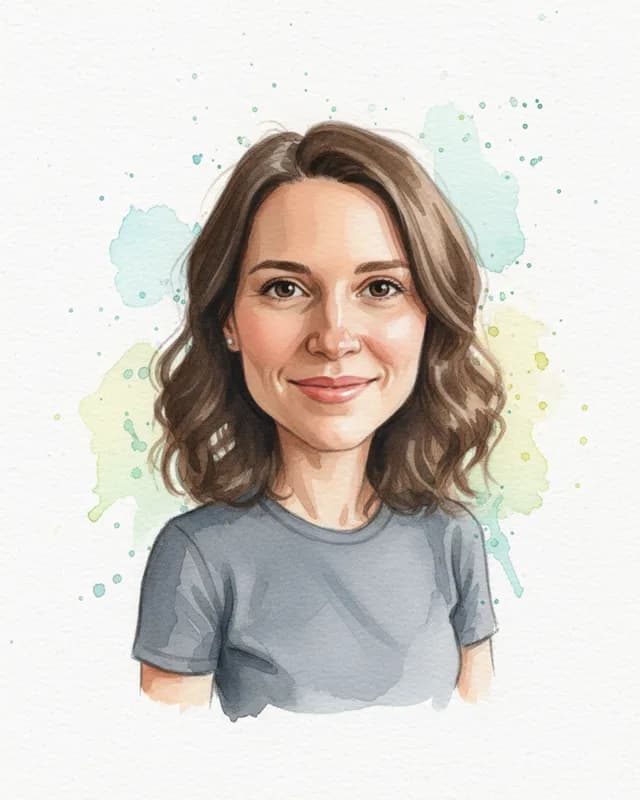
- Test photo
- Illustrative photo of a woman, 896 x 1152 px, 131 KB JPG
- Result
- Watercolor caricature
- Style
- Watercolor
- HD file
- 2048 x 2560 px JPG
- Print size at 256 dpi
- 8 x 10 in
- Free preview
- 1024 x 1280 px, watermarked
- Made by
- gemini-2.5-flash-image
- Style prompt
- 165 words
- HD file size
- 991 KB
How we test: every style gets the same test photos, and we compare each caricature with its photo by hand. More on the about page.
What happens during the conversion
The conversion runs in four short stages, and you only see the last one. First, the server reads the file header. It checks the real format, so a renamed file does not slip through. It also rejects pictures under 256 px on a side and animated images.
Second, the server makes a working copy. That copy stands upright, so a sideways phone shot is fine. It also shrinks to 1280 px on its longest side, and a transparent PNG gets a white background.
Third, the copy goes to the image model together with the prompt for your style. The model is Google Gemini 2.5 Flash Image, and it gets one request per drawing. Finally, the server trims the result to 4:5, adds the watermark and sends it to your browser.
File formats and sizes, in and out
Three formats go in: JPG, PNG and WebP. HEIC files from an iPhone are not on the list, so export those as JPG first. The upload limit is 12 MB, which covers most phone pictures.
Two formats come out. The free preview is a WebP file at 1024 x 1280 px, because WebP stays small and loads fast. In contrast, the paid file is a JPG at 2048 x 2560 px. Almost any print shop or photo app opens a JPG, and that size prints at 8 x 10 inches at 256 dpi.
Both results are vertical, in a 4:5 shape. A wide landscape shot therefore does not keep its shape, so place the face near the middle.
What happens to your photo after the caricature is ready
Nothing stays with us. The server holds your upload in memory for that single request. It writes no copy to disk, and it keeps no gallery of results. We also do not train anything on your pictures.
The file does leave our server once, though. It travels to Google for the drawing, since the model runs there. That is a fair thing to know before you upload a face.
So how can a credit open the exact preview you saw, if we store nothing? The clean version rides along with the preview in a sealed, encrypted form. Your browser holds it, and only our server can open it. After 24 hours it expires.
Our own conversion in the Watercolor style
We sent our test picture through this page's default style. The original shows a woman with wavy brown hair, a gray T-shirt and a calm, closed smile. The result is a soft painting on white paper, with pale green, yellow and blue splashes behind her.
Her hair, her shirt and her smile all carried over. The head grew only a little, however. Watercolor is the gentlest of the ten styles, so choose Big head or Classic when you want a stronger effect.
When a photo to caricature tool is not a good choice
A converter suits a quick, fun picture. It does not suit a live event, where a hand-drawn sketch from a street artist is the real attraction. It is also the wrong tool for a group of three or more people.
In addition, the result is a flat image file. You do not get layers or vector shapes, and the model writes no names or captions into the picture. Small symbols may still appear on props.
The likeness can miss, too. No tool of this kind can promise an exact match, so judge the free preview with your own eyes. And only convert pictures of people who agreed to it.
Photo to caricature: formats and sizes
| Item | Details |
|---|---|
| Formats in | JPG, PNG, WebP |
| Upload limit | 12 MB |
| Smallest picture | 256 px on each side |
| Not accepted | Animated images, HEIC, PDF |
| Working copy | Upright, up to 1280 px on the longest side |
| Image model | Google Gemini 2.5 Flash Image, one request per drawing |
| Free preview | 1024 x 1280 px WebP with a watermark |
| Paid file | 2048 x 2560 px JPG, no watermark, 1 credit |
| Shape | Vertical 4:5 |
| Stored afterward | Neither the upload nor the result |
Photo to caricature FAQ
How do I turn a photo into a caricature online for free?
Upload the file, pick a style and press the button. Two previews a day are free and need no account. However, each preview carries a watermark.
Which file formats can I upload?
You can upload JPG, PNG and WebP files of up to 12 MB. For an iPhone HEIC file, export it as a JPG first, and then upload that.
What size is the finished picture?
The free preview is 1024 x 1280 px. The paid file is 2048 x 2560 px instead, which prints at 8 x 10 inches at 256 dpi.
Is my picture stored on your server?
No. The server keeps it in memory for one request and then forgets it. We store only technical facts about the job, such as the style and whether it worked.
Does Google get my picture?
Yes, for that one request. The drawing comes from Google Gemini 2.5 Flash Image, so the working copy travels to Google. We do not keep it after the response.
Can I convert the same picture twice?
Yes. Each run draws a new picture, so two runs never match exactly. To get the preview you already like in HD, use the HD button under it within 24 hours.
Why did the converter refuse my file?
The usual reasons are the format, the size or a face the model cannot find. So check that the file is a JPG, PNG or WebP and that the face is clear.