Wedding caricature from one couple photo
To make a wedding caricature, upload one photo that shows you both and keep the theme set to bride and groom. The tool then draws the two of you in wedding outfits with a few oversized props. First check the free watermarked preview. After that, one credit returns a clean 2048 x 2560 px file for cards and signs.
By The Mugdoodle team (Product and testing). Last updated .
1. Your photo
JPG, PNG or WebP up to 12 MB
One or two people, faces toward the camera, good light.
The picture gets an outfit and props that fit. Leave it empty for a plain caricature.
We delete your photo as soon as the picture is made. Only upload photos of yourself or of people who agreed to it.
How to make a wedding caricature, step by step
First, choose one photo with both of you in it. An everyday photo is fine, because the outfits get drawn.
Then upload it as a JPG, PNG or WebP file, up to 12 MB.
Next, keep Cartoon selected, or try another of the ten styles.
After that, leave bride and groom in the theme box, or type your own words, up to 60 characters.
Finally, check both faces on the free preview, then spend one credit on the HD file.
The first 2 previews each day are free. After that, see the pricing page for packs and plans, or read how we test the tool.
Wedding caricature tested with a real photo file
We sent our own test photo through the same style prompt this page uses. The person in it is illustrative: an image model made that photo, so it shows no real person. Below you can see the photo next to the caricature, so you can judge the likeness yourself.
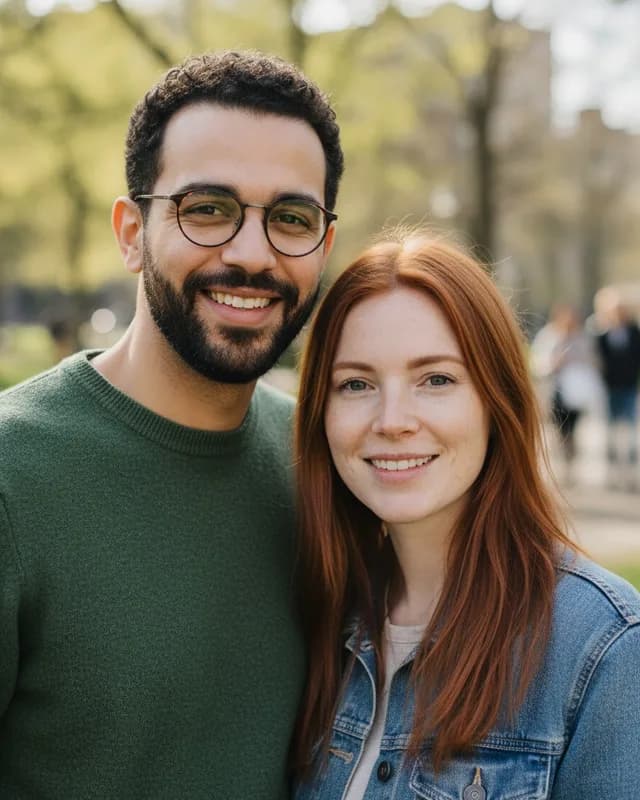
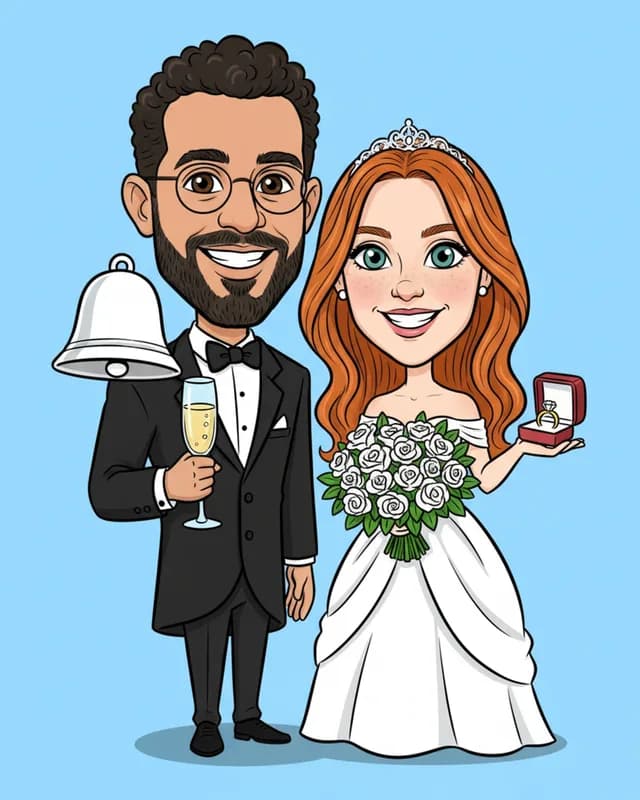
- Test photo
- Illustrative photo of a couple, 896 x 1152 px, 239 KB JPG
- Result
- Cartoon caricature, theme "bride and groom"
- Style
- Cartoon
- Theme
- bride and groom
- HD file
- 2048 x 2560 px JPG
- Print size at 256 dpi
- 8 x 10 in
- Free preview
- 1024 x 1280 px, watermarked
- Made by
- gemini-2.5-flash-image
- Style prompt
- 177 words
- HD file size
- 775 KB
How we test: every style gets the same test photos, and we compare each caricature with its photo by hand. More on the about page.
What a wedding caricature from this tool looks like
On this page the theme box opens with the words bride and groom. As a result, the model dresses you for the day, even if your photo shows a sweater and a denim jacket. Ours did exactly that.
In our Cartoon test render, the couple stands full length on a sky blue background. He wears a black tuxedo with a bow tie and holds a glass of champagne. She wears a white gown and a small tiara, and she carries a bouquet of white roses. In addition, a ring box sits in her open hand, and a silver bell floats beside them.
The faces stayed recognizable in that test. For example, his beard, curly hair and round glasses are all there, and so are her long red hair and freckles. However, the dress and the suit are invented. So the picture will not match your real wedding clothes.
Four ways to use it: cards, signs and the guest book
Save the dates come first. The picture has no text, so place it in a card layout and add your names and the date there. Similarly, thank you cards work well, because guests enjoy a drawing more than one more posed photo.
A welcome sign is the second use. Print the picture large, set it on an easel by the door, and add a line of text under it.
The guest book is the third. For instance, print the picture in the middle of a large sheet with a wide white border. Guests then sign around it, and the sheet goes in a frame afterward.
Print sizes from the 2048 x 2560 file
The HD file is a 4:5 picture, 2048 x 2560 px. Therefore it fits an 8 x 10 inch print with no cropping, at 256 dpi. A 4 x 5 inch card insert also fits exactly, at 512 dpi.
A 5 x 7 inch card has a different shape. At full height the file gives about 366 dpi, but roughly a tenth of the width is trimmed from the sides. So keep both heads away from the edges, or leave white bars instead.
For a 16 x 20 inch welcome sign, the same file gives 128 dpi. That looks soft from very close, yet guests read a sign from a few steps away. Beyond that size the softness shows, so we would not go larger. We deliver the file only. Printing stays with you or your print shop.
When to hire a live wedding caricature artist instead
Hire a live artist when the drawing is the entertainment. At a reception, an artist draws guests one by one, and each guest takes home an original on paper. This tool cannot do that. It makes one digital file from one photo.
A live artist is also the right call for groups. Our pictures hold one or two people, so the wedding party, the parents or a whole table are out of scope. Likewise, an artist can write names and dates into the drawing, while our pictures carry no text.
Finally, we do not guarantee an exact likeness, and we supply a JPG, not a vector file. Please upload only photos of people who agreed. If any of this matters for your day, book the artist and use this page for the paper goods.
Wedding picture files and print sizes
| Item | Details |
|---|---|
| Photo | One JPG, PNG or WebP with both of you, up to 12 MB |
| Theme on this page | bride and groom, editable, up to 60 characters |
| Style on this page | Cartoon, with nine other styles to pick |
| Free preview | 1024 x 1280 px WebP with a watermark, 2 a day |
| HD file | 2048 x 2560 px JPG, no watermark, one credit |
| 4 x 5 inch print | 512 dpi, no cropping |
| 5 x 7 inch card | About 366 dpi, sides trimmed by about a tenth |
| 8 x 10 inch print | 256 dpi, no cropping |
| 16 x 20 inch sign | 128 dpi, fine from a few steps away |
| Text in the picture | None. Add names and dates in your card layout |
Wedding caricature FAQ
Is there a wedding caricature maker online free?
Yes, for the preview. You get two free previews a day with a watermark, and you need no account. However, the clean file for printing costs one credit. Ten credits cost $6.99.
Can I make a wedding caricature from a photo of us in normal clothes?
Yes. The theme draws the outfits, so any clear photo of you both works. In our test, a sweater and a denim jacket became a tuxedo and a white gown.
Can it draw my real dress?
No. The model invents the gown and the suit from the theme words. Therefore the picture shows a wedding look, but not your exact dress.
Can I add our names and the wedding date?
Not inside the picture, because the prompt asks for no text. Instead, add them in the card or sign layout. Any print shop or card editor can do that.
Can I use the picture on save the dates and invitations?
Yes. Place the HD file in any card layout and print it. It fits 8 x 10 inches exactly, and a 5 x 7 card with a small trim at the sides.
Can the tool draw our whole wedding party?
No. One photo may show one or two people, so a group of three or more is out of scope. For a group, hire an artist instead.
Is a wedding caricature a good gift for the couple?
It can be, if you have a photo they are happy to share. So ask first. Then print the HD file at 8 x 10 inches and frame it.