ChatGPT caricature generator: how it works and when to skip the prompt
To use ChatGPT as a caricature generator, add a photo with the plus icon, then type what you want, for example a friendly caricature of me as a nurse. ChatGPT Images draws it, and you ask for changes in the chat. If you do not want to write a prompt, the tool on this page needs one photo and one click.
By The Mugdoodle team (Product and testing). Last updated .
1. Your photo
JPG, PNG or WebP up to 12 MB
One or two people, faces toward the camera, good light.
The picture gets an outfit and props that fit. Leave it empty for a plain caricature.
We delete your photo as soon as the picture is made. Only upload photos of yourself or of people who agreed to it.
How to use ChatGPT as a caricature generator, step by step
First, open ChatGPT on the web or in the iOS or Android app.
Then tap the plus icon and select Add photos and files. Pick a PNG or JPEG photo under 20 MB.
Next, type your prompt, for example: draw a friendly caricature of the person in this photo.
After that, wait for the picture. OpenAI says image generation may take a few minutes.
Finally, ask for changes in the chat, or select part of the image and describe the edit.
The first 2 previews each day are free. After that, see the pricing page for packs and plans, or read how we test the tool.
ChatGPT caricature generator tested with a real photo file
We sent our own test photo through the same style prompt this page uses. The person in it is illustrative: an image model made that photo, so it shows no real person. Below you can see the photo next to the caricature, so you can judge the likeness yourself.
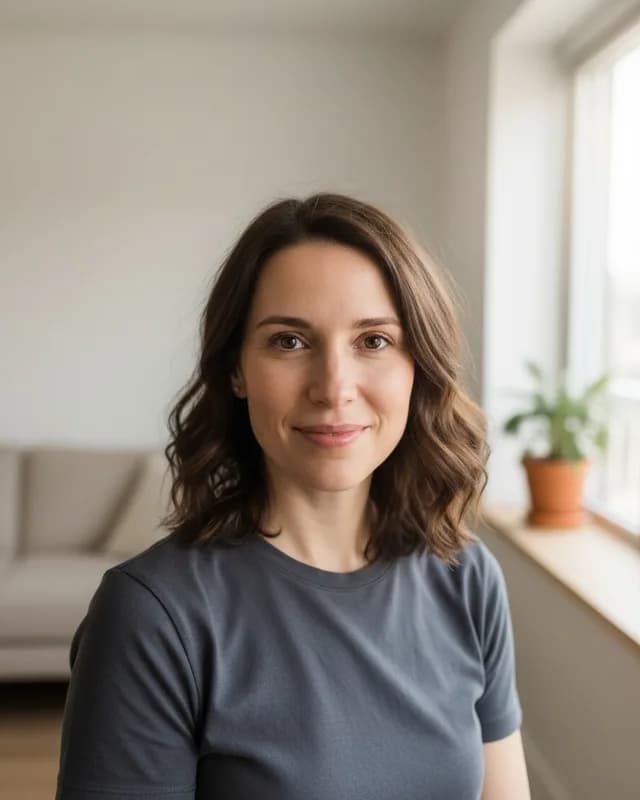
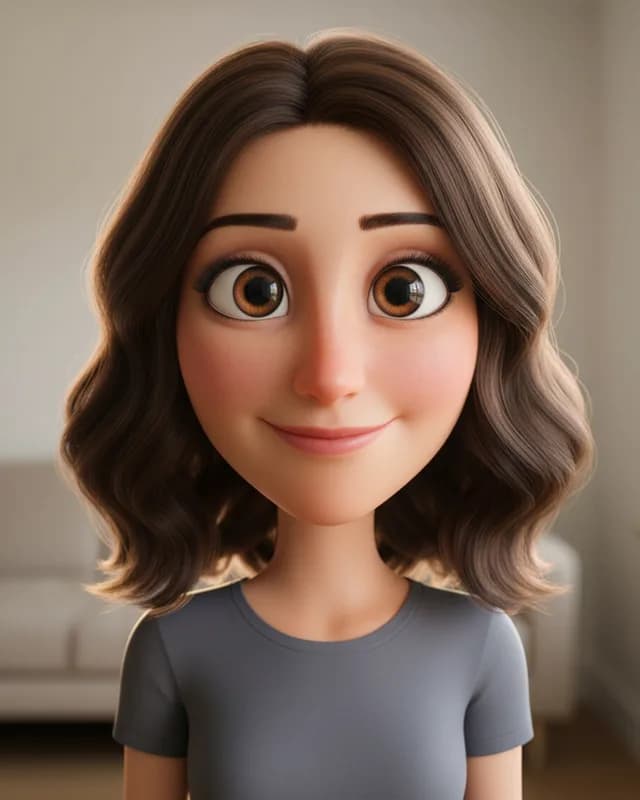
- Test photo
- Illustrative photo of a woman, 896 x 1152 px, 131 KB JPG
- Result
- 3D cartoon caricature
- Style
- 3D cartoon
- HD file
- 2048 x 2560 px JPG
- Print size at 256 dpi
- 8 x 10 in
- Free preview
- 1024 x 1280 px, watermarked
- Made by
- gemini-2.5-flash-image
- Style prompt
- 156 words
- HD file size
- 775 KB
How we test: every style gets the same test photos, and we compare each caricature with its photo by hand. More on the about page.
What OpenAI states about the ChatGPT caricature generator route
ChatGPT has no button named caricature. Instead, you use ChatGPT Images, its general image tool, and you describe the drawing in words. According to OpenAI's help pages, ChatGPT Images is available on all tiers, on the web, iOS and Android. You can also upload an existing image and describe the changes you want.
The upload rules are short. ChatGPT accepts PNG, JPEG and non-animated GIF files, up to 20 MB per image. Our tool also takes WebP, although its limit is lower, at 12 MB.
Limits are less clear. OpenAI says image creation on the Free tier has its own usage limit, and ChatGPT tells you when you reach it. However, the help pages give no number for images. They do say that Free users get three file uploads a day, and that this can drop during peak hours. So check your plan before you plan a batch.
When ChatGPT is the better choice
Sometimes ChatGPT simply fits better. First, it can add text to a picture, so a name or a caption is possible there. Our tool asks the model for no text at all. Second, you can pick any aspect ratio, while we always return a vertical 4:5 picture.
ChatGPT also lets you edit by talking. For example, you can say make the hat bigger, or select one area and change only that. In addition, it can use what you told it in earlier chats, which is how the job trend of 2026 got its personal details. Therefore, if you already pay for a plan and enjoy writing prompts, start there.
When a caricature generator with no prompt wins
A prompt is the hard part for many people. In ChatGPT, you have to ask for the style, the big head, the background and the likeness yourself. If you forget one, the result drifts. Here, each of the ten styles has a fixed prompt that already covers those points. So you pick Classic, Big head or Chibi, and that is all.
No account is another difference. Our two free previews a day need no sign-up. They do carry a watermark, and each is 1024 x 1280 px. One credit then buys the clean 2048 x 2560 px file of the exact preview you saw. As a result, you pay only for a drawing you already approved.
What we do not know about ChatGPT
We are not affiliated with OpenAI, and we tested nothing inside ChatGPT for this page. Instead, we read four OpenAI help pages on October 13, 2026, and we repeat only what they say. The links sit at the bottom.
Those pages do not state a daily image number, an output size in pixels or a watermark rule. Because of that, this page makes no claim about them. Limits also change often, so read the help pages again before you rely on any number here.
When this tool is not a good choice
Our tool has clear limits too. It cannot write a name or a caption inside the picture, and it does not make vector files. It also cannot promise an exact likeness, so check the free preview first.
For a group of three or more people, pick something else, because one photo may show one or two people here. For a live event, hire an artist who draws by hand. And whatever tool you use, upload only photos of people who agreed to it.
ChatGPT caricature generator and this tool: the differences
| Point | ChatGPT (per OpenAI help pages) and this tool |
|---|---|
| Prompt | ChatGPT: you write it. This tool: none, you pick one of ten styles |
| Account | ChatGPT: not stated for image creation. This tool: no account for the free previews |
| Photo formats | ChatGPT: PNG, JPEG, non-animated GIF. This tool: JPG, PNG, WebP |
| Photo size limit | ChatGPT: 20 MB per image. This tool: 12 MB |
| Free limit | ChatGPT: a separate image limit, number not stated. This tool: 2 previews a day |
| Text in the picture | ChatGPT: can add text. This tool: no text |
| Shape | ChatGPT: any aspect ratio. This tool: vertical 4:5 only |
| Edits | ChatGPT: in the chat or with a selection tool. This tool: run another style |
| Output size | ChatGPT: not stated. This tool: 1024 x 1280 px free, 2048 x 2560 px paid |
| Watermark | ChatGPT: not stated. This tool: on free previews, none on paid files |
| Model | ChatGPT: ChatGPT Images. This tool: Google Gemini 2.5 Flash Image |
ChatGPT caricature generator FAQ
Is the ChatGPT caricature generator free?
OpenAI says ChatGPT Images is available on all tiers, so the Free tier can create images. However, it has a separate usage limit, and the help pages give no number. So check your plan.
How do I make a caricature on ChatGPT?
Tap the plus icon, select Add photos and files and pick your photo. Then type a prompt that asks for a friendly caricature, and wait for the picture.
Is there a ChatGPT caricature generator with no prompt?
Not inside ChatGPT, because you always describe the image there. This page offers the other route: one photo, one of ten styles and no prompt.
What prompt should I use in ChatGPT?
Ask for four things: keep the likeness, exaggerate in a friendly way, name the background and ask for no text. Our caricature prompts page has ready lines to copy.
Why does ChatGPT say I reached the image limit?
Image creation has its own limit on the Free tier, separate from chat. According to OpenAI, you then wait for a later time, or you upgrade your plan.
Can a ChatGPT caricature generator prompt include my job?
Yes, simply name the job in the prompt. On this page you type the job in the theme box, up to 60 characters, and the props follow.
Is this site part of ChatGPT?
No. It is an independent tool that uses Google Gemini 2.5 Flash Image. Your photo goes to Google for that one request, and we store nothing after the response.